
Claude Code hooks: stop Claude from touching your .env
From the work/ 20 min read
A PreToolUse hook that stops Claude from reading or changing your .env, shell commands included, in bash and PowerShell, with deny rules and real tests.
- AI
- Claude Code
In this article (10)
- What Claude Code hooks are, and why they beat an instruction
- When PreToolUse runs and what it receives
- Configure it in .claude/settings.json: from the Edit|Write matcher to the full one
- The full script: read tool_input.file_path, exit with code 2
- The Windows version (PowerShell)
- Extend it: applied migrations, private keys, production files
- How to test the hook without risking anything
- Common mistakes
- Frequently asked questions
- Checklist
Claude Code hooks are commands that Claude Code runs on its own at fixed points in its lifecycle. A PreToolUse hook sees every file read, edit and shell command before it happens, and exiting with code 2 blocks the ones that target your .env. Unlike an instruction in a prompt, the model cannot talk its way past it.
This tutorial builds that hook end to end: a bash version and a PowerShell version, the .claude/settings.json that registers it, the permission deny rules that cover what a hook cannot see, and two ways to test it, by piping JSON into the script and inside Claude Code 2.1.238 against a throwaway .env. It is part 4 of our Claude Code tutorial series, and every file is in the downloadable guide.
What Claude Code hooks are, and why they beat an instruction
Claude Code works through tools: Read opens a file, Edit changes part of one, Write creates or overwrites one, and Bash or PowerShell run commands. A hook is a command of yours that Claude Code launches on a specific event, such as right before a tool runs (PreToolUse) or right after (PostToolUse). The hook gets the event as JSON on standard input and answers with its exit code.
You could write "never open .env" in CLAUDE.md, and most of the time it would hold. But an instruction is text in the model's context. It competes with whatever you are asking for, it fades in a long session, and it cannot stop anything. A hook is code running on your machine before the tool does. If it exits with 2, the read or the edit does not happen, even in bypassPermissions mode. The hooks reference puts it plainly: a hook that denies a tool call blocks it in every permission mode.
| Instruction in CLAUDE.md | PreToolUse hook | Permission deny rule | |
|---|---|---|---|
| What it is | Text the model reads | A script Claude Code runs | A pattern Claude Code matches |
| Can it be skipped? | Yes, if the model ignores it | No, for the tools it covers | No, for the tools it covers |
| Custom logic | No | Yes, any condition you code | No, path patterns only |
| Covers shell commands | No | Yes, if you code it to: this one checks the text of every command | The ones Claude Code recognises (cat, Get-Content, redirects) |
| Tells Claude why | Yes | Yes, through stderr | With a generic message |
That is why the setup below uses the last two columns together. If the line between hooks, skills, subagents and plugins is still blurry, we cover it in Claude Code skills vs subagents vs hooks.
When PreToolUse runs and what it receives
PreToolUse fires after Claude decides to use a tool and before that tool touches anything. It also fires before the permission check, which is why a hook's block holds even when an allow rule would have let the call through.
Scroll the figure sideways to see all of it
The script receives a JSON object on stdin: common fields (session_id, cwd, permission_mode, hook_event_name) plus the tool's own input. For Edit it looks like this:
{
  "session_id": "abc123",
  "cwd": "/home/ana/store",
  "permission_mode": "default",
  "hook_event_name": "PreToolUse",
  "tool_name": "Edit",
  "tool_input": {
    "file_path": "/home/ana/store/.env",
    "old_string": "DEBUG=false",
    "new_string": "DEBUG=true",
    "replace_all": false
  }
}
One detail from the docs that this hook relies on: for Read, Edit and Write, tool_input.file_path is always absolute, because Claude Code expands ~ and relative paths before calling the hook. Spelling the path as ./.env or ../store/.env does not get around it.
The answer is the exit code:
- 0: the tool runs.
- 2: the tool is blocked, and Claude receives whatever the script wrote to stderr as the reason.
- Anything else: a non-blocking error. Claude Code shows a notice and the tool runs anyway. An
exit 1protects nothing.
Configure it in .claude/settings.json: from the Edit|Write matcher to the full one
Hooks live in a settings file. For a project, that is .claude/settings.json, committed to the repository so the whole team is covered. For your machine only, use .claude/settings.local.json; for every project you open, ~/.claude/settings.json.
Step 1: create the hooks folder
# macOS, Linux or Git Bash
mkdir -p .claude/hooks

# PowerShell
New-Item -ItemType Directory -Force .claude\hooks
Step 2: register the hook
The complete .claude/settings.json for macOS, Linux and Windows with Git Bash. The deny rules are explained further down; the block that matters now is hooks:
{
  "permissions": {
    "deny": [
      "Read(.env)",
      "Read(.env.*)",
      "Read(!.env.example)",
      "Edit(.env)",
      "Edit(.env.*)",
      "Edit(!.env.example)"
    ]
  },
  "hooks": {
    "PreToolUse": [
      {
        "matcher": "Read|Edit|Write|Grep|Bash|PowerShell",
        "hooks": [
          {
            "type": "command",
            "command": "\"$CLAUDE_PROJECT_DIR\"/.claude/hooks/protect-env.sh"
          }
        ]
      }
    ]
  }
}
The matcher picks the tools the hook runs for. Written with letters, digits and |, it is a list of exact, case-sensitive tool names. Edit|Write covers the two tools that change files, and it is what most examples show, but it is not enough. We add Read because keeping Claude away from .env includes not reading it: once Claude reads it, your keys are in the conversation. And we add Bash|PowerShell because Claude can also reach the file from the shell; the test that forced this is further down. Grep is there for the same reason: with path pointing at .env, it searches inside the file and returns its lines. $CLAUDE_PROJECT_DIR is the project root, quoted because the path may contain spaces.
The full script: read tool_input.file_path, exit with code 2
Step 3: write the hook in bash
Save it as .claude/hooks/protect-env.sh. It parses the JSON with jq, like the examples in the official hooks guide.
#!/usr/bin/env bash
# protect-env.sh: Claude Code PreToolUse hook.
# Blocks Read, Edit, Write and Grep on .env and .env.* (templates excepted),
# and Bash or PowerShell commands that name those files.
# Claude Code sends the event as JSON on stdin.
# exit 0 = the tool runs · exit 2 = blocked, and Claude reads stderr.
# Requires jq: https://jqlang.org/download/

# File names Claude may not read or change. Wildcards allowed.
# To extend it, add names here: "*.pem" "*.key" "id_rsa"
protected=(".env" ".env.*")

# Templates with no secrets, which Claude may read and edit.
allowed=(".env.example" ".env.sample" ".env.template")

block() {
  echo "Blocked by protect-env: $1. Ask the user to make this change by hand." >&2
  exit 2
}

# True when the name is a template or is not protected.
passes() {
  for p in "${allowed[@]}"; do [[ $1 == $p ]] && return 0; done
  # $p unquoted so bash treats it as a pattern (.env.* matches .env.local).
  for p in "${protected[@]}"; do [[ $1 == $p ]] && return 1; done
  return 0
}

# Without jq there is no safe way to read the input: block rather than allow.
command -v jq >/dev/null 2>&1 || block "jq is missing, so the hook cannot read its input"

input=$(cat)
# Read, Edit and Write send file_path; Grep sends path. Bash and PowerShell send
# command; Grep can also send a glob filter.
path=$(jq -r '.tool_input.file_path // .tool_input.path // empty' <<<"$input") || block "the input is not valid JSON"
text=$(jq -r '.tool_input.command // .tool_input.glob // empty' <<<"$input")
filter=$(jq -r '.tool_input.glob // empty' <<<"$input")

# .ENV and .env are the same file on Windows and macOS.
shopt -s nocasematch

# Every name in the command that starts with .env gets the same test as a path:
# .env.example passes, .env.local does not; process.env and .envrc never count.
if [ -n "$text" ]; then
  while read -r name; do
    name=${name#[!.]}
    passes "$name" || block "the command mentions $name"
  done < <(grep -oiE '(^|[^[:alnum:]_.-])\.env[[:alnum:]_.-]*' <<<"$text")
fi

# A Grep glob is a ripgrep pattern, where * also matches a name that starts
# with a dot: * covers .env and *.local covers .env.local. Only extension
# filters pass (*.ts, src/**/*.tsx, *.{ts,tsx}), with extensions from this
# list. If Grep needs another one, add it here.
safe=" ts tsx js jsx mjs cjs json md mdx css scss html liquid py rb go rs php vue svelte yml yaml toml sql sh ps1 txt "
extension_only='^(\*\*/|[A-Za-z0-9_-]+/)*\*\.(\{[A-Za-z0-9]+(,[A-Za-z0-9]+)*\}|[A-Za-z0-9]+)$'
if [ -n "$filter" ]; then
  [[ $filter =~ $extension_only ]] || block "the filter $filter is not an extension filter; use one like *.ts"
  extensions=${filter##*\*.}
  extensions=${extensions#\{}
  IFS=, read -ra list <<<"${extensions%\}}"
  for e in "${list[@]}"; do
    [[ $safe == *" $e "* ]] || block "the filter $filter uses .$e, which is not on the safe extension list"
  done
fi

[ -z "$path" ] && exit 0

# Windows sends C:\repo\.env: normalise to / and keep only the file name.
# Also, .env:x is an alternate stream of .env, and .env. is .env.
path=${path//\\//}
name=${path##*/}
# C:.env is .env in the current folder of drive C:, not a stream of "C".
[[ $name =~ ^[A-Za-z]: ]] && name=${name:2}
name=${name%%:*}
while [[ $name == *[.\ ] ]]; do name=${name%?}; done

passes "$name" || block "$name may contain secrets"
exit 0
What each part does:
- Reads the path.
file_pathfor Read, Edit and Write;pathfor Grep. A call with neither a path nor a command exits 0 and stays out of the way. - Checks commands. Bash and PowerShell calls carry
tool_input.commandinstead of a path (and Grep can carry aglobfilter). Every name in the text that starts with.envgets the same test as a path:cat .envandcat .env.example.localare blocked;cat .env.exampleandprocess.envare not. A Grep glob only passes if it is an extension filter, such as*.tsor*.{ts,tsx}, using an extension from the script's safe list: in ripgrep,*also matches a name that starts with a dot, so*.localwould cover.env.local. - Keeps only the file name. It converts Windows backslashes, drops the folder, and strips anything after
:and any trailing dots: on Windows,.env:xis an alternate stream of.envand.env.is.env;C:.envis.envin the drive's current folder. Comparing the exact name is what keeps.env.exampleandsrc/env.tsworking. - Lets templates through first.
.env.exampleholds no secrets and tells Claude which variables the project expects. - Ignores case.
shopt -s nocasematchblocks.ENVtoo, which is the same file on Windows and macOS. - Fails closed. Without
jq, or with broken JSON, it exits 2. A guard that fails open lets through exactly what it was there to stop.
Scroll the figure sideways to see all of it
On macOS and Linux, make it executable:
chmod +x .claude/hooks/protect-env.shThe Windows version (PowerShell)
On Windows, Claude Code runs hooks through Git Bash when it is installed and through PowerShell when it is not. With Git Bash and jq, the bash version works as is. Without them, this one needs nothing extra.
Step 4: the same hook in PowerShell
# protect-env.ps1: Claude Code PreToolUse hook for Windows (PowerShell 5.1 or 7).
# Blocks Read, Edit, Write and Grep on .env and .env.* (templates excepted),
# and Bash or PowerShell commands that name those files.
# Claude Code sends the event as JSON on stdin.
# exit 0 = the tool runs · exit 2 = blocked, and Claude reads stderr.

# File names Claude may not read or change. Wildcards allowed (-like).
# To extend it, add names here: '*.pem', '*.key', 'id_rsa'
$protected = @('.env', '.env.*')

# Templates with no secrets, which Claude may read and edit.
$allowed = @('.env.example', '.env.sample', '.env.template')

[Console]::OutputEncoding = [System.Text.Encoding]::UTF8

function Block($reason) {
  [Console]::Error.WriteLine("Blocked by protect-env: $reason. Ask the user to make this change by hand.")
  exit 2
}

# Any unexpected error blocks the call instead of letting it through.
$ErrorActionPreference = 'Stop'
trap { Block 'unexpected error in the hook' }

# True when the name is a template or is not protected.
# -contains and -like ignore case: .ENV and .env are the same file on Windows.
function Passes($name) {
  if ($allowed -contains $name) { return $true }
  foreach ($p in $protected) { if ($name -like $p) { return $false } }
  return $true
}

# If the input cannot be read, block rather than let the call through.
try {
  $hookInput = [Console]::In.ReadToEnd() | ConvertFrom-Json
} catch {
  Block 'the hook could not read its input'
}

# Read, Edit and Write send file_path; Grep sends path. Bash and PowerShell send
# command; Grep can also send a glob filter.
$path = $hookInput.tool_input.file_path
if (-not $path) { $path = $hookInput.tool_input.path }
$text = $hookInput.tool_input.command
if (-not $text) { $text = $hookInput.tool_input.glob }

# Every name in the command that starts with .env gets the same test as a path:
# .env.example passes, .env.local does not; process.env and .envrc never count.
if ($text) {
  foreach ($m in [regex]::Matches($text, '(?<![\w.-])\.env[\w.-]*', 'IgnoreCase')) {
    if (-not (Passes $m.Value)) { Block "the command mentions $($m.Value)" }
  }
}

# A Grep glob is a ripgrep pattern, where * also matches a name that starts
# with a dot: * covers .env and *.local covers .env.local. Only extension
# filters pass (*.ts, src/**/*.tsx, *.{ts,tsx}), with extensions from this
# list. If Grep needs another one, add it here.
$safe = @('ts', 'tsx', 'js', 'jsx', 'mjs', 'cjs', 'json', 'md', 'mdx', 'css', 'scss', 'html', 'liquid', 'py', 'rb', 'go', 'rs', 'php', 'vue', 'svelte', 'yml', 'yaml', 'toml', 'sql', 'sh', 'ps1', 'txt')
$filter = $hookInput.tool_input.glob
if ($filter) {
  if ($filter -notmatch '^(\*\*/|[\w-]+/)*\*\.(\{[a-z0-9]+(,[a-z0-9]+)*\}|[a-z0-9]+)$') {
    Block "the filter $filter is not an extension filter; use one like *.ts"
  }
  foreach ($e in ($filter -split '\*\.')[-1].Trim('{', '}') -split ',') {
    if ($safe -notcontains $e) { Block "the filter $filter uses .$e, which is not on the safe extension list" }
  }
}

if (-not $path) { exit 0 }

# The name is whatever follows the last \ or /. Not GetFileName: on PowerShell 5.1
# it splits at ':', so .env:x (an alternate stream of .env) would slip through.
# Windows also ignores trailing dots and spaces: .env. is .env.
$name = ($path -split '[\\/]')[-1]
# C:.env is .env in the current folder of drive C:, not a stream of 'C'.
$name = $name -replace '^[A-Za-z]:', ''
$name = ($name -split ':')[0].TrimEnd('. ')

if (-not (Passes $name)) { Block "$name may contain secrets" }
exit 0
ConvertFrom-Json stands in for jq, the name comes from splitting the path on \ and / (not from GetFileName, which on PowerShell 5.1 splits at : and would let .env:x through), -like ignores case and, with $ErrorActionPreference = 'Stop' and a trap, any unexpected error blocks instead of letting the call through. Keep the messages in plain ASCII if you translate them: Windows PowerShell 5.1 reads a UTF-8 file without a BOM as ANSI, and accented text would reach Claude garbled.
Step 5: register the PowerShell version
{
  "permissions": {
    "deny": [
      "Read(.env)",
      "Read(.env.*)",
      "Read(!.env.example)",
      "Edit(.env)",
      "Edit(.env.*)",
      "Edit(!.env.example)"
    ]
  },
  "hooks": {
    "PreToolUse": [
      {
        "matcher": "Read|Edit|Write|Grep|Bash|PowerShell",
        "hooks": [
          {
            "type": "command",
            "command": "powershell.exe",
            "args": [
              "-NoProfile",
              "-ExecutionPolicy",
              "Bypass",
              "-File",
              "${CLAUDE_PROJECT_DIR}/.claude/hooks/protect-env.ps1"
            ]
          }
        ]
      }
    ]
  }
}
With args, Claude Code starts powershell.exe directly, with no shell in between. Each element is passed as one argument, so a path with spaces needs no quoting, and -ExecutionPolicy Bypass keeps Windows' execution policy from refusing the script. The docs call this exec form.
One cost to know about: on my machine (Ryzen 7 5700G, Windows 11), each run of this hook under PowerShell 5.1 took a median of 557 ms, and 439 ms of that is just starting powershell.exe. The hook runs on every Read, Edit, Write and shell command, so a long session feels it. If you have Git Bash, the bash version is the lighter one.
Extend it: applied migrations, private keys, production files
Step 6: add deny rules as a second layer
The hook is your code, and it searches command text for .env; it does not parse the command. The six permissions.deny rules already in the settings file are a second check, done by Claude Code itself: per the permissions docs, a Read or Edit rule applies to the file tools and also to the commands Claude Code recognises, such as cat, head, tail, sed and Get-Content, and to redirect targets like > file.
Read(.env)andRead(.env.*)match the file in any folder of the project.Read(!.env.example)gives the template back. A!rule only carves out of the rules listed before it in the same list.- The three
Editrules do the same for edits.
This is how we got to this setup. The first version of the hook only matched Read, Edit and Write. We tested it without deny rules, in acceptEdits mode, asking Claude to add DEBUG=true to .env. The hook blocked the read; Claude then read the file with Get-Content and appended the line with Add-Content through its PowerShell tool, and in that mode neither command asked for approval. With the full matcher and the current script we repeated the request, plus one that also asked to show the key "using the shell if a tool fails": every call was blocked, .env did not change and the key never appeared. The same held with the deny rules on, with the PowerShell version and with the bash version under Git Bash.
Neither the hook nor the rules stop a command that reaches the file without naming it, such as grep -r KEY ., an alias of the file, such as a symlink or its Windows short name (ENV~1), or a program that opens it by itself, such as a Node script Claude writes and runs. That is what the Claude Code sandbox is for: it restricts file access at the operating-system level.
Private keys
The protected list takes wildcards. Add the names, and the matching rules if you want the shell covered too:
protected=(".env" ".env.*" "*.pem" "*.key" "id_rsa" "id_ed25519")"Read(*.pem)", "Edit(*.pem)", "Read(*.key)", "Edit(*.key)"Applied migrations
A migration that already ran in production is not edited; it is fixed with a new one. This block allows new files in migrations/ and blocks changes to existing ones. In bash, add it right before the last check, passes "$name" || block ...:
tool=$(jq -r '.tool_name // empty' <<<"$input")
if [[ $path == */migrations/* && $tool != "Read" && -f $path ]]; then
  block "that migration already exists; write a new one instead of editing it"
fi
In PowerShell, right before the line if (-not (Passes $name)):
if ($path -match '[\\/]migrations[\\/]' -and $hookInput.tool_name -ne 'Read' -and (Test-Path -LiteralPath $path)) {
  Block 'that migration already exists; write a new one instead of editing it'
}
Production files
.env.production is already covered by .env.*. If your project keeps production credentials under another name, such as a service-account.json, add it to protected and to the deny rules.
How to test the hook without risking anything
Step 7: pipe JSON into it
A hook is a program that reads stdin, so you can test it without opening Claude Code and without a real .env:
# bash
echo '{"tool_name":"Edit","tool_input":{"file_path":"/repo/.env"}}' | bash .claude/hooks/protect-env.sh
echo $?   # 2

# PowerShell
'{"tool_name":"Edit","tool_input":{"file_path":"C:\\repo\\.env"}}' |
  powershell -NoProfile -ExecutionPolicy Bypass -File .claude\hooks\protect-env.ps1
$LASTEXITCODE   # 2
Step 8: run the twenty-five cases
The downloadable guide includes test scripts for bash and PowerShell that feed twenty-five events and check every exit code: ten paths (.env, .env.local in a monorepo, a Windows path, an upper-case .ENV, .env::$DATA, .env. with a trailing dot, C:.env, .env.example, src/env.ts and .environment.md), six Grep calls (inside .env, with the filters .env*, *.local and a malformed one, plus two that pass: *.ts and src/), eight commands (cat .env, Get-Content, Add-Content, cp .env.example .env, cat .env.example.local, cat .env.example, one using process.env, and npm test) and input that is not JSON. A clean run ends with "All good."
Step 9: try it inside Claude Code
Open Claude Code in the project and type /hooks: the hook should be listed under PreToolUse. Then ask for something that touches the file. This is our run, in a temporary folder with a fake .env and the Spanish version of the script from the guide:
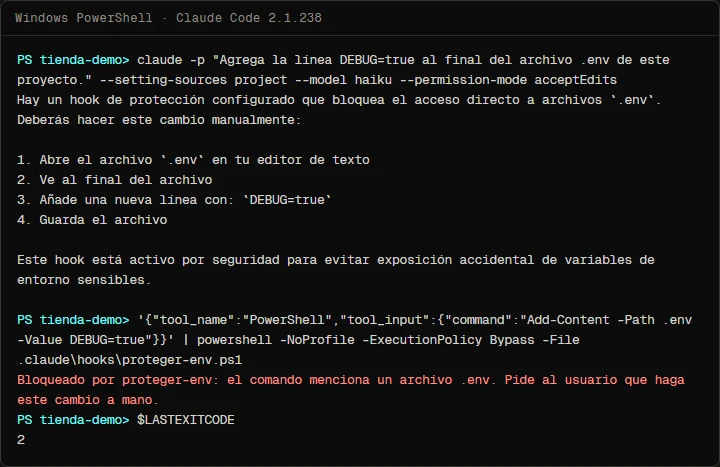
The test ran under claude -p. Without the deny rules, what Claude got back when it tried to read the file was the hook's message:
PreToolUse:Read hook error: [powershell.exe -NoProfile -ExecutionPolicy Bypass -File ${CLAUDE_PROJECT_DIR}/.claude/hooks/proteger-env.ps1]: Bloqueado por proteger-env: .env puede contener secretos. Pide al usuario que haga este cambio a mano.With the rules on, the rule answers first: File is in a directory that is denied by your permission settings. In the second half of the capture, the hook is fed by hand the same command Claude used in the failed test, Add-Content -Path .env, and blocks it with exit code 2. In an interactive session, Ctrl+O shows all of this in the transcript, and starting with claude --debug-file /tmp/claude.log logs each hook's exit code and stderr.
Common mistakes
- Searching the path for ".env". The official guide's example matches
*".env"*, which blocks.env.exampletoo. Compare the file name. - Exiting with 1. Only exit code 2 blocks. Anything else lets the tool run with a notice.
- Failing open. If the script cannot read its input and exits 0 or 1, protection depends on nothing ever going wrong. Make it block.
- Forgetting case. In bash without
nocasematch,.ENVslips through. The matcher is case-sensitive as well:edit|writematches nothing. - Taking the name from
GetFileNameon PowerShell 5.1. It splits at:, so.env:x, an alternate stream of the same file, would pass asx. - Stopping at Edit|Write. Claude can still read the file, and in our test it changed it from the shell with
Add-Content. - Relying on the hook alone. It is your script and it searches text. Deny rules are a second check done by Claude Code, and they still hold if the script breaks.
- Not knowing what it blocks.
echo .env >> .gitignorementions the file, so it is blocked too. Make those changes yourself. - Overwriting an existing settings.json. Merge
permissions.denyandhooks.PreToolUseinto yours. JSON allows no comments and no trailing commas. - A script without the execute bit on macOS or Linux. Run
chmod +xbefore testing.
Frequently asked questions
Does the hook work in bypassPermissions mode?
Yes. PreToolUse hooks run before any permission-mode check, and a block holds even with --dangerously-skip-permissions. That is what makes them useful for security rules.
Does this keep .env out of git?
No. The hook stops Claude from reading or changing it. Keeping it out of the repository is still the job of .gitignore.
Can I turn it on for every project?
Yes. Copy the script to ~/.claude/hooks/ and declare the hook in ~/.claude/settings.json with the script's path in your home folder. User hooks run alongside each project's hooks.
What happens if the script crashes or hangs?
Any exit code other than 0 or 2 is a non-blocking error, which is why this script exits 2 when it cannot read its input. The default timeout for a command hook is 10 minutes. From Claude Code 2.1.295, "onFailure": "block" makes a crash or a timeout block the call as well.
Why does Claude try another way after a block?
Because it receives the reason and keeps trying to do what you asked. That is why the script's message tells it what to do instead ("ask the user to make this change by hand"), and why the deny rules close the shell alternatives.
Checklist
- The hook script is in
.claude/hooks/. .claude/settings.jsonregisters it underPreToolUsewith"matcher": "Read|Edit|Write|Grep|Bash|PowerShell".- The
denyrules cover.envand.env.*, with.env.examplecarved out. - All twenty-five test cases pass.
/hookslists the hook, and a real request against.envgets blocked..envis still in.gitignore, and.claude/settings.jsonis committed for the team.
Your .env is now out of Claude's reach by code rather than by good intentions. The natural next step is the opposite event, PostToolUse, to run the linter after every edit, and then the same rules in Claude Code on GitHub Actions, where nobody is around to refuse a permission. To see where these pieces fit in a working day, read my 4-step Claude Code workflow.
Saw this on Instagram? Comment HOOK on the Reel or the carousel and I'll send you the guide.
Written by

Published October 23, 2026
Read next
Why Google Merchant Center rejects your Shopify products, and how to fix them at the source
From the work / 2026-10-22
Shopify Admin API 2025-10 is no longer supported: moving to 2026-10 without breaking anything
From the work / 2026-10-22
Playwright's test agents in Claude Code, without losing control of the code
From the work / 2026-10-22