
Anthropic skills for Claude Code: 5 worth installing today
From the work/ 11 min read
What frontend-design, webapp-testing, mcp-builder, skill-creator and pdf do, how to install them with tested commands and which one fits your project.
- AI
- Claude Code
In this article (7)
Anthropic's official skills live in the anthropics/skills repository, which doubles as a Claude Code plugin marketplace. Two plugins give you five skills that pay off in almost any web project: frontend-design, webapp-testing, mcp-builder and skill-creator come in example-skills, and pdf comes in document-skills.
This guide covers what a skill is, what each of the five does, how to install them with commands we tested on Claude Code 2.1.238, and which one to pick for your project. It is part 15 of our Claude Code tutorial series. If you are new to this, first read how to give an AI coding agent the right context: a skill is context that only loads when it is needed.
What skills are and where Anthropic keeps the official ones
A skill is a folder with a SKILL.md file: Markdown instructions under a YAML header that states its name and when to use it, sometimes with scripts or reference documents next to it. Per the Claude Code skills documentation, Claude keeps the description of every available skill in context and loads the full body only when a task matches it or you invoke it with /skill-name. That is why a long skill costs almost nothing until you use it.
Anthropic's skills live at github.com/anthropics/skills. The repository ships a .claude-plugin/marketplace.json that turns it into a marketplace named anthropic-agent-skills. That marketplace does not install single skills: it bundles them into plugins. We checked it on October 30, 2026, and it had five:
| Plugin | What it brings |
|---|---|
example-skills | 12 skills, including frontend-design, webapp-testing, mcp-builder and skill-creator |
document-skills | 4 document skills: xlsx, docx, pptx and pdf |
claude-api | Documentation for the Claude API and SDKs |
academy-guide | Recommends Claude Academy courses and tutorials |
discernment-nudge | Adds follow-up questions that help you check an answer |
The README itself says these skills are published for demonstration and educational purposes, and that what Claude does may differ from what they show. Treat them like any code you did not write: read them before you trust them with your project.
Scroll the figure sideways to see all of it
The 5 skills: frontend-design, webapp-testing, mcp-builder, skill-creator and pdf
We picked these five because they cover the jobs that keep coming back in web work: designing interfaces, testing them, connecting services, writing your own skills and handling PDFs. The token figures in this section are the estimates claude plugin details printed for our test install, not a measurement of real usage.
frontend-design
Design judgment so an interface does not come out with the same generic look as every other generated page: start from the project's real subject, choose type on purpose, use borders, numbering or labels only when they carry information, and critique the result before handing it over. It has no scripts, just 71 lines of instructions. Reach for it when you ask for a new page or redesign an existing one. Paired with a solid AI landing page prompt, it is the change that moves the visual result the most.
webapp-testing
A toolkit for testing local web apps with Playwright: Claude writes Python scripts, starts your server with the scripts/with_server.py helper, takes screenshots and reads the browser logs. It needs Python with Playwright installed. We put it through a full store purchase path in part 12 of the series.
mcp-builder
A four-phase guide to building MCP (Model Context Protocol) servers: research the API and plan, implement, review and test, then write evaluations. It recommends TypeScript with the official SDK and also covers Python with FastMCP. Use it when you want Claude to work with a service that has no MCP server yet, such as your store's internal API.
skill-creator
The skill that writes skills: it asks what you want to automate, drafts the SKILL.md, runs test cases with and without the skill to compare them, and tunes the description so Claude triggers it at the right moments. Its evaluation scripts are Python. It is the heaviest of the five once invoked, at roughly 8.3k estimated tokens.
Read PDFs, extract text and tables, merge, split, rotate, create documents and fill forms. It uses Python libraries (pypdf, pdfplumber, reportlab) and command-line tools such as pdftotext and qpdf when they are installed. Handy for invoices, spec sheets or supplier catalogs. Its license differs from the other four.
Licenses and context cost
| Skill | Plugin | License | Tokens: always / when used |
|---|---|---|---|
| frontend-design | example-skills | Apache 2.0 | ~60 / ~2.3k |
| webapp-testing | example-skills | Apache 2.0 | ~60 / ~920 |
| mcp-builder | example-skills | Apache 2.0 | ~80 / ~2.8k |
| skill-creator | example-skills | Apache 2.0 | ~90 / ~8.3k |
document-skills | Proprietary, source-available | ~110 / ~2k |
You can copy, modify and redistribute the first four under Apache 2.0. The document skills (docx, pdf, pptx and xlsx) are, in the README's words, "source-available, not open source": their LICENSE.txt points to your agreement with Anthropic and forbids copies, derivative works and redistribution. Use pdf as the plugin installs it; do not copy it into your repository to change it.
How to add the marketplace and install Anthropic skills
Inside a Claude Code session, the repository's README gives these commands:
/plugin marketplace add anthropics/skills
/plugin install example-skills@anthropic-agent-skills
/plugin install document-skills@anthropic-agent-skills
/plugin marketplace add anthropics/skillsregisters the GitHub repository as a marketplace. Theowner/repoform is enough. The marketplace takes the name itsmarketplace.jsondeclares:anthropic-agent-skills./plugin install example-skills@anthropic-agent-skillsinstalls the plugin with the twelve example skills. What goes after the@is the marketplace name, not the repository. Per the docs, inside a session this command does not install right away: it opens the/pluginpanel on the plugin's details so you can review it and choose a scope./plugin install document-skills@anthropic-agent-skillsdoes the same for the four document skills. Skip it if you will not use pdf.
If you would rather click than type, /plugin with no arguments opens the panel on the Discover tab: search for example-skills, press Enter and pick a scope. The Marketplaces tab in the same panel adds or updates marketplaces.
Scroll the figure sideways to see all of it
From your shell, without opening a session
The same steps exist as shell commands, per the plugin install documentation. These are the ones we ran on Windows 11 with Claude Code 2.1.238:
claude plugin marketplace add anthropics/skills
claude plugin install example-skills@anthropic-agent-skills
claude plugin install document-skills@anthropic-agent-skills
claude plugin list- The first line clones the repository and registers the marketplace. It ends with
Successfully added marketplace: anthropic-agent-skills (declared in user settings). - The second and third install each plugin at user scope, the default, so they are available in every project on that machine. To enable a plugin for one repository and share it with your team, add
--scope project; for yourself in a single repository,--scope local. claude plugin listconfirms the version, the scope and whether each plugin is enabled.
Here is the real output in PowerShell. We ran it against an isolated config directory so the machine's own Claude Code setup stayed untouched:
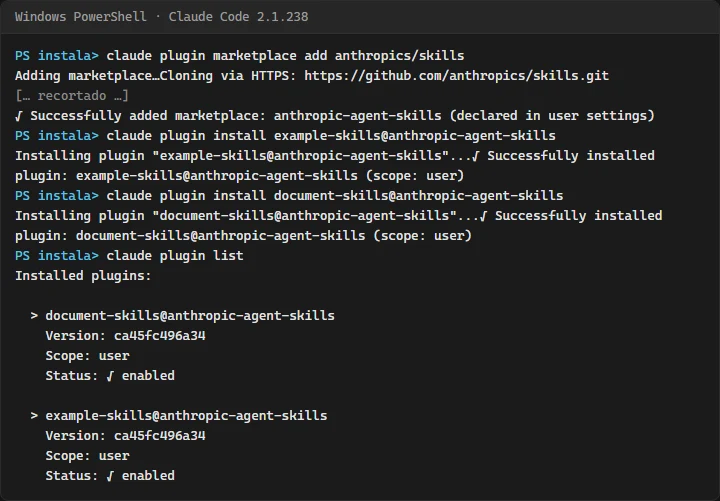
Version ca45fc496a34 is the repository commit that got installed, from October 28, 2026. Plugins installed from the shell load in your next session, or after /reload-plugins in one that is already open. To check they work, type / in a session: the skills show up prefixed with the plugin name, such as /example-skills:frontend-design or /document-skills:pdf.
If it fails over SSH
Our first attempt failed with SSH authentication failed. Please ensure your SSH keys are configured for GitHub, or use an HTTPS URL instead. With the owner/repo form, Claude Code clones over SSH when it thinks your key works with GitHub. The docs provide a variable that forces HTTPS. In PowerShell:
$env:CLAUDE_CODE_PLUGIN_PREFER_HTTPS = "1"
claude plugin marketplace add anthropics/skills- The first line sets
CLAUDE_CODE_PLUGIN_PREFER_HTTPSfor that PowerShell window only. In Bash the equivalent isexport CLAUDE_CODE_PLUGIN_PREFER_HTTPS=1. - The second repeats the
marketplace add, which this time printedCloning via HTTPS: https://github.com/anthropics/skills.gitand succeeded.
What it costs in context
Before you keep a plugin around, claude plugin details tells you what it brings and how much room it takes. This is a literal excerpt of what it printed for example-skills:
Component inventory
  Skills (12)  algorithmic-art, brand-guidelines, canvas-design, doc-coauthoring, frontend-design, internal-comms, mcp-builder, skill-creator, slack-gif-creator, theme-factory, web-artifacts-builder, webapp-testing
  Agents (0)
  Hooks (0)
  MCP servers (0)
  LSP servers (0)

Projected token cost
Always-on: ~939 tok added to every session- Component inventory: twelve skills and nothing else. With no hooks and no MCP servers, the plugin runs nothing on its own; it adds instructions, and a skill's scripts run only when Claude uses them, under your permission rules.
- Always-on: about 939 estimated tokens in every session, which is the twelve skill descriptions.
document-skillsadds about 759 more.
The plugin security page reminds you that a plugin can run code with your privileges and is worth reviewing before you install it. It also lists anthropic-agent-skills among Anthropic's official marketplace names, which auto-update by default. To update by hand, run claude plugin update example-skills@anthropic-agent-skills; in our test it reported the plugin was already at the latest version.
Which one to install for your project
You do not need all five. Install the plugin that carries the one you will use this week and leave the rest for when you need it:
| If your project… | Use | Plugin | You need |
|---|---|---|---|
| Has new pages or components to design | frontend-design | example-skills | Nothing else |
| Has a flow that breaks silently: checkout, login, a form | webapp-testing | example-skills | Python and Playwright |
| Needs Claude to use an API with no MCP server | mcp-builder | example-skills | Node with TypeScript, or Python |
| Repeats the same instructions every session | skill-creator | example-skills | Python for the evaluations |
| Processes invoices, spec sheets or catalogs as PDF | document-skills | Python and its PDF libraries |
Scroll the figure sideways to see all of it
If all you want is frontend-design or skill-creator, there is another route: the official claude-plugins-official marketplace, which Claude Code adds the first time you open an interactive session, also lists them as standalone plugins. We saw them in its marketplace.json; we did not install them that way in this test. And if you want to look beyond Anthropic, our GitHub repos for AI agents this week reviews five community projects with their licenses and the permissions they ask for.
Common mistakes
- Putting the repository after the @.
example-skills@anthropics/skillsdoes not work. It takes the marketplace name:example-skills@anthropic-agent-skills. When in doubt,claude plugin marketplace listshows it next to its source. - Installing before adding the marketplace. The only one Claude Code adds by itself is
claude-plugins-official. Foranthropic-agent-skills, themarketplace addcomes first. - Expecting the skill in the session you already had open. What you install from the shell loads in the next session or after
/reload-plugins. - Installing everything "just in case". Every plugin adds its skill descriptions to all your sessions. If you do not need one,
claude plugin disableturns it off without uninstalling it. - Copying the pdf skill into your repository to change it. Its license does not allow it. If you need a different version, write your own with skill-creator.
- Assuming Python is there. webapp-testing, skill-creator and pdf run Python scripts. Without Python, Claude will try another route or ask to install things; make that call yourself.
Frequently asked questions
Are Anthropic skills free?
Installing them costs nothing: they sit in a public repository. Using them spends tokens from your plan or API, like any other instruction. The pdf skill has a proprietary license: you can use it, not copy or redistribute it.
Can I install a single skill from a plugin?
Not from this marketplace: it installs whole plugins. You can disable an entire plugin with claude plugin disable, or install frontend-design and skill-creator on their own from claude-plugins-official.
Do I have to install them in every project?
No. At user scope, the default, they apply to all your projects. With --scope project the install is recorded in .claude/settings.json and shared with your team; each person installs it once on their machine.
How do I know Claude is using the skill?
Invoke it by name, for example /example-skills:webapp-testing, or ask for it in the prompt. When a task matches its description, Claude also loads it on its own, without you naming it.
Checklist
claude plugin marketplace listshowsanthropic-agent-skillswithanthropics/skillsas its source.- You installed only the plugins you will use, at the right scope.
claude plugin listshows them as enabled.- You read each skill's
SKILL.mdbefore using it on a real project. - You have Python and Playwright if you plan to use webapp-testing.
- You did not copy document skills into your repository.
Skills give Claude a method; the context is still on you. To get the most out of them, write a solid landing page prompt before reaching for frontend-design, and review how to give an agent the right context so it knows when each skill applies. The full method is in my 4-step Claude Code workflow, and the other parts are in the Claude Code series.
Saw this on Instagram? Comment INSTALA on the Reel and I'll send you the guide.
Written by

Published October 30, 2026 · updated November 1, 2026