
Claude webapp-testing skill: test your store with Playwright
From the work/ 9 min read
How to use the webapp-testing skill to explore your store's purchase path and turn it into a Playwright test that runs in CI.
- AI
- Claude Code
In this article (8)
Anthropic's webapp-testing skill teaches Claude Code to test a local web app with Playwright for Python: it starts the server, navigates, takes screenshots and reads the DOM before acting. Use it to explore your store's purchase path and turn what it finds into a test that runs on every pull request.
This tutorial covers what the skill needs, how to install it from Anthropic's official skills repository and how to take the product, cart and checkout path into a Playwright test in your CI, with a demo store included in the guide. It is part 12 of our Claude Code tutorial series. Each section says what we actually ran and what we did not.
What the webapp-testing skill is and what it needs
A skill is a folder with a SKILL.md that Claude reads when a task matches its description. The webapp-testing one lives at github.com/anthropics/skills, and its description says it is for interacting with and testing local web applications using Playwright: checking frontend behaviour, debugging the UI, capturing screenshots and reading browser logs.
The important part is in its instructions:
- It writes Playwright scripts in Python, with
sync_playwright()and Chromium in headless mode. - It ships a helper,
scripts/with_server.py, which starts one or more servers, waits for them to respond, runs your script and shuts them down. The skill tells Claude to run it with--helpbefore reading its source, to keep the context clean. - It follows a reconnaissance-then-action pattern: navigate, wait for
networkidle, take a screenshot or read the DOM, pick selectors from what it sees and only then act.
So it needs two things on your machine: Python, and the Playwright library for Python with its browser.
pip install playwright
playwright install chromium
To be upfront: on the machine where we wrote this guide we did not install Playwright for Python, so we did not run the skill. What we did test, and show below, is the result it leads to: the purchase-path test with @playwright/test, run locally and ready for CI.
Install it from Anthropic's marketplace
The anthropics/skills repository is also a plugin marketplace for Claude Code. Inside Claude Code:
/plugin marketplace add anthropics/skills
/plugin install example-skills@anthropic-agent-skills
The marketplace is called anthropic-agent-skills and has several plugins. webapp-testing is part of example-skills, alongside eleven other skills:
| Plugin | Skills it includes |
|---|---|
example-skills | webapp-testing, frontend-design, mcp-builder, skill-creator, web-artifacts-builder, theme-factory, canvas-design, algorithmic-art, brand-guidelines, doc-coauthoring, internal-comms, slack-gif-creator |
document-skills | xlsx, docx, pptx, pdf |
claude-api | claude-api |
The repository itself warns that these skills are examples for demonstration and educational purposes. Read them before trusting them with your project, like any code you did not write. With the plugin installed you do not need to name the skill: asking for a task that matches its description, such as "test my store's checkout on localhost", is enough.
Explore the purchase path
The path that matters in a store is short: product, cart, checkout. The guide includes a demo store with exactly that, served with Node and no dependencies:
Scroll the figure sideways to see all of it
With the skill installed, the exploration request would look like this:
Start the store with "node server.js" on port 4173. Walk through it: open the Basic T-shirt,
add it to the cart, go to checkout and confirm with the email test@example.com. Take a
screenshot at each step and tell me which selectors you would use for a test.
Per its SKILL.md, since this is a JavaScript app with no server running yet, Claude should use with_server.py to start the store and write a Python script that navigates, waits for networkidle, captures each screen and lists the buttons, links and fields. That is the exploration: throwaway scripts that show you what the page looks like inside.
What you take away from it are the selectors. Ask for them by role and visible text ("the Add to cart button", "the Email field"), not by CSS classes or positions: a redesign changes the classes, but rarely changes what the customer reads.
From exploration to a test in your CI
The exploration gets thrown away; the test stays. The step worth taking is asking Claude to turn what it found into a Playwright test in your project's language. In a JavaScript project, that is @playwright/test:
Scroll the figure sideways to see all of it
This is the demo store's test, with selectors by role and text:
// Purchase path in the demo store: product, cart and checkout.
// It uses roles and visible text, like the ones exploration finds.
import { expect, test } from "@playwright/test";

test("product, cart and test checkout", async ({ page }) => {
  await page.goto("/");
  await page.getByRole("link", { name: "Basic T-shirt" }).click();

  await page.getByRole("button", { name: "Add to cart" }).click();
  await expect(page.getByRole("status")).toHaveText("Added to cart");
  await expect(page.getByRole("link", { name: "Cart (1)" })).toBeVisible();

  await page.getByRole("link", { name: "Cart (1)" }).click();
  await expect(page.getByRole("cell", { name: "Basic T-shirt" })).toBeVisible();
  await expect(page.getByRole("cell", { name: "€19.99" })).toBeVisible();

  await page.getByRole("link", { name: "Go to checkout" }).click();
  await page.getByLabel("Email").fill("test@example.com");
  await page.getByRole("button", { name: "Place test order" }).click();

  await expect(page.getByRole("heading", { name: "Test order confirmed" })).toBeVisible();
  await expect(page.getByRole("link", { name: "Cart (0)" })).toBeVisible();
});

test("an empty cart does not lead to checkout", async ({ page }) => {
  await page.goto("/cart.html");
  await expect(page.getByText("Your cart is empty.")).toBeVisible();
  await expect(page.getByRole("link", { name: "Go to checkout" })).toBeHidden();
});
The config starts the store before the tests with webServer, just as with_server.py did during exploration:
import { defineConfig, devices } from "@playwright/test";

export default defineConfig({
  testDir: "tests",
  retries: process.env.CI ? 1 : 0,
  use: { baseURL: "http://localhost:4173", trace: "on-first-retry" },
  // Playwright starts the store before the tests and stops it afterwards.
  webServer: { command: "node server.js", url: "http://localhost:4173", reuseExistingServer: !process.env.CI },
  projects: [{ name: "chromium", use: { ...devices["Desktop Chrome"] } }],
});
We ran it locally with Playwright 1.62, on both the English and the Spanish store: both tests passed. To check the test is worth something, we broke the Spanish store on purpose by removing the line that empties the cart after the order is placed. The test caught it:
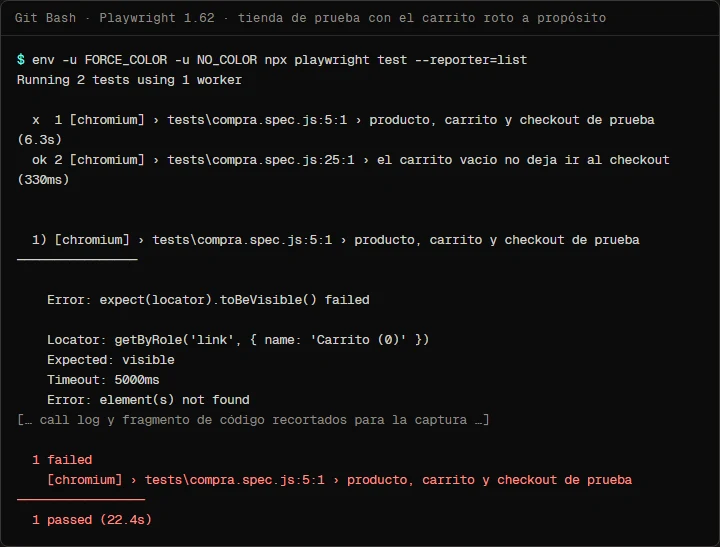
With the line restored, both tests passed again. To run this on every pull request, the guide's workflow installs Chromium on the runner and runs the tests:
# Runs the purchase path with Playwright on every PR and every push to main.
name: E2E

on:
  pull_request:
  push:
    branches: [main]

jobs:
  e2e:
    runs-on: ubuntu-latest
    timeout-minutes: 15
    permissions:
      contents: read
    steps:
      - uses: actions/checkout@v6
      - uses: actions/setup-node@v7
        with:
          node-version: 22
      - run: npm ci
      - run: npx playwright install --with-deps chromium
      - run: npx playwright test
The YAML is validated, but we did not run it on GitHub for this guide. If you also want Claude to explain failures in the log, combine it with the step from part 9 of the series.
Limits: test data, payments and production stores
- Test data. Use made-up emails and addresses, like
test@example.com. Never real customer data, neither in the test nor in the exploration screenshots. - Payments. The test must not charge anything. In your own store, use your gateway's test mode. On Shopify, development stores allow test orders with the test gateway (Bogus Gateway) or Shopify Payments' test mode.
- Never against production. A purchase test on the live store creates orders, takes stock, emails the team and pollutes your analytics. Point it at
localhost, a preview environment or a development store. - The store password. Shopify development stores are usually password-protected; the test has to get past that screen first, with the password in a CI secret.
- What the test does not see. It checks that the path works, not that prices are right for each market or that taxes are correct. Those need tests of their own.
Common mistakes
- Keeping exploration scripts as tests. Fixed waits and screenshots are for looking, not for CI. Turn the exploration into
@playwright/test. - Selectors by class or position.
.btn-primary:nth-child(2)breaks with the first redesign. Use role and text. - Inspecting before the page has loaded. The skill itself warns about it: in a JavaScript app, wait for
networkidlebefore reading the DOM. - Forgetting to start the server in CI. Without
webServerin the config, the test fails on the connection, not on your code. - Pointing it at the live store "just once". That once leaves a real order behind.
- Installing every skill without reading them. The plugin brings twelve; install it knowing what each one does.
Frequently asked questions
Do I need Python if my project is JavaScript?
For the skill, yes: its exploration scripts are Python. The test you keep can be in your project's language, like this guide's with @playwright/test.
How is it different from Playwright's agents?
Playwright's agents are subagents that plan, generate and repair tests inside a project that already uses @playwright/test. The skill is lighter: it gives Claude a method for exploring any local web app. The agents are covered in Playwright test agents with Claude Code.
Does it work with a Shopify theme running locally?
Yes, if the theme runs locally with shopify theme dev: the skill can start that server with with_server.py and explore the preview. Shopify's checkout does not run locally, so the payment step gets tested on a development store.
How many purchase tests do I need?
Few and stable. One per critical path (simple purchase, with a coupon, with an empty cart) catches more real bugs than fifty fragile tests. Before a big date, the checkout smoke test is the minimum.
Can Claude fix the test when it fails?
It can propose the fix, but you decide whether the test or the store is wrong. In our test, it failed because the store was broken, which is exactly what it was supposed to do.
Checklist
- Python and Playwright for Python are installed, if you are going to use the skill.
- The
example-skillsplugin is installed and you read webapp-testing'sSKILL.md. - Exploration runs against
localhostor a development store, never production. - The test uses selectors by role and visible text.
- The test data is made up, and payment is a test one or absent.
- The test runs in CI on every pull request and fails if you break checkout on purpose.
The skill speeds up looking at the page; the value is in the test that stays. To have that test arrive with a plan behind it, start with plan mode; to run it and have it explained in your pipeline, continue with Claude Code in GitHub Actions; and for a second reading of the code, the reviewer subagent. The overall method is in my 4-step Claude Code workflow.
Saw this on Instagram? Comment TEST on the Reel or the carousel and I'll send you the guide.
Written by

Published October 26, 2026 · updated October 28, 2026