
Claude Code PostToolUse hook: run ESLint after every edit
From the work/ 12 min read
A PostToolUse hook that lints each file Claude edits with ESLint, Prettier or Biome and hands the errors back to Claude, in bash and PowerShell.
- AI
- Claude Code
In this article (8)
A Claude Code PostToolUse hook is the way to run ESLint after every edit Claude makes. With an Edit|Write matcher, Claude Code runs it as soon as the edit lands; the hook lints that one file and, if errors remain, exits with code 2 so Claude reads the report and fixes it in the same session.
This tutorial builds that hook for ESLint, Prettier or Biome, in bash and PowerShell, limited to .ts, .tsx and .js files. We tested it with all three tools and inside Claude Code 2.1.238. It is part 5 of our Claude Code tutorial series; the previous one, the hook that protects your .env, uses the opposite event, PreToolUse.
What PostToolUse is and what the hook receives
A hook is a command of yours that Claude Code runs at a fixed point in its lifecycle. PostToolUse fires right after a tool completes successfully. If PreToolUse is the doorman deciding whether something happens, PostToolUse is the reviewer looking at what already did. The difference from telling Claude "run the linter when you're done" is that an instruction depends on the model remembering; the hook always runs.
On stdin the script gets a JSON object with tool_name, tool_input (the arguments Claude sent) and tool_response (what the tool returned). This hook needs one field: tool_input.file_path, the file Claude just created or edited.
Scroll the figure sideways to see all of it
What the hook says back is decided by its exit code, per the hooks reference:
| Exit code | What happens in PostToolUse | Who hears about it |
|---|---|---|
0 | All good. Claude never sees stderr. | Nobody |
2 | It cannot block (the edit already happened), but stderr reaches Claude next to the tool result. | Claude |
| Anything else | A non-blocking error: you see a notice with the first line of stderr. | You |
The script follows that split: code errors go to Claude with exit 2, and install or configuration problems go to you with exit 1, so Claude does not try to "fix" your eslint.config.js.
Configure it in .claude/settings.json
Step 1: register the hook
At the project root, in .claude/settings.json (the one the team commits and shares):
{
  "hooks": {
    "PostToolUse": [
      {
        "matcher": "Edit|Write",
        "hooks": [
          {
            "type": "command",
            "command": "\"$CLAUDE_PROJECT_DIR\"/.claude/hooks/lint-file.sh"
          }
        ]
      }
    ]
  }
}
The matcher is a list of exact tool names: Edit|Write covers the two tools that change files. The official hooks guide uses the same matcher for its Prettier example. $CLAUDE_PROJECT_DIR is the project root, quoted because the path may contain spaces.
Step 2: the bash script
Save it as .claude/hooks/lint-file.sh and, on macOS or Linux, make it executable with chmod +x.
#!/usr/bin/env bash
# lint-file.sh: Claude Code PostToolUse hook.
# After every Edit or Write on a .ts, .tsx or .js file, runs the linter on that
# file only. Whatever the linter could not fix goes back to Claude on stderr.
# exit 0 = clean or not applicable · exit 2 = errors for Claude · exit 1 = notice for you.
# Requires jq: https://jqlang.org/download/

# eslint, prettier or biome.
linter="eslint"

command -v jq >/dev/null 2>&1 || { echo "lint-file: jq is missing" >&2; exit 1; }

path=$(jq -r '.tool_input.file_path // empty') || { echo "lint-file: invalid input" >&2; exit 1; }
case "$path" in
  *.ts|*.tsx|*.js) ;;
  *) exit 0 ;;
esac

# Use the linter installed in the project, not a global one or one downloaded on the fly.
root=${CLAUDE_PROJECT_DIR:-$PWD}
bin="$root/node_modules/.bin/$linter"
[ -x "$bin" ] || { echo "lint-file: cannot find $bin" >&2; exit 1; }

case "$linter" in
  eslint)   output=$("$bin" --fix "$path" 2>&1) ;;
  prettier) output=$("$bin" --write "$path" 2>&1) ;;
  biome)    output=$("$bin" check --write "$path" 2>&1) ;;
  *) echo "lint-file: unknown linter: $linter" >&2; exit 1 ;;
esac
code=$?
[ $code -eq 0 ] && exit 0

# ESLint exits 2 when its configuration fails, not your code: that one is for you.
if [ "$linter" = eslint ] && [ $code -eq 2 ]; then
  echo "lint-file: ESLint could not run. $(echo "$output" | head -n 3)" >&2
  exit 1
fi

# The first 30 lines only: enough to fix the code without flooding Claude's context.
{
  echo "The linter ($linter) found problems in $path:"
  echo "$output" | head -n 30
} >&2
exit 2
What it does, in order:
- Filters by extension. A
.md,.jsonor.cssexits 0 without wasting time. - Uses the project's linter. It calls
node_modules/.bin/eslintdirectly, not throughnpx: nothing gets downloaded, no global version that differs from yourpackage.jsonsneaks in, and you skipnpx's start-up. - Lints one file and lets the tool fix what it can (
--fix,--write). - Reports what is left. If the linter exits with an error, it writes the first 30 lines to stderr and exits 2.
- Keeps your problems apart from Claude's. With no linter installed, or ESLint exiting 2 (its code for "the configuration failed"), it warns you with exit 1.
Step 3: the Windows version
Claude Code runs hooks through Git Bash when it is installed and through PowerShell when it is not. This version does not need jq:
# lint-file.ps1: Claude Code PostToolUse hook for Windows (PowerShell 5.1 or 7).
# After every Edit or Write on a .ts, .tsx or .js file, runs the linter on that
# file only. Whatever the linter could not fix goes back to Claude on stderr.
# exit 0 = clean or not applicable · exit 2 = errors for Claude · exit 1 = notice for you.

# eslint, prettier or biome.
$linter = 'eslint'

[Console]::OutputEncoding = [System.Text.Encoding]::UTF8

try {
  $hookInput = [Console]::In.ReadToEnd() | ConvertFrom-Json
} catch {
  [Console]::Error.WriteLine('lint-file: invalid input')
  exit 1
}

$path = $hookInput.tool_input.file_path
if (-not $path -or $path -notmatch '\.(ts|tsx|js)$') { exit 0 }

# Use the linter installed in the project, not a global one or one downloaded on the fly.
$root = if ($env:CLAUDE_PROJECT_DIR) { $env:CLAUDE_PROJECT_DIR } else { (Get-Location).Path }
$bin = Join-Path $root "node_modules\.bin\$linter.cmd"
if (-not (Test-Path -LiteralPath $bin)) {
  [Console]::Error.WriteLine("lint-file: cannot find $bin")
  exit 1
}

switch ($linter) {
  'eslint'   { $output = & $bin --fix $path 2>&1 }
  'prettier' { $output = & $bin --write $path 2>&1 }
  'biome'    { $output = & $bin check --write $path 2>&1 }
  default    { [Console]::Error.WriteLine("lint-file: unknown linter: $linter"); exit 1 }
}
$code = $LASTEXITCODE
if ($code -eq 0) { exit 0 }

# With 2>&1, PowerShell 5.1 wraps every stderr line in an ErrorRecord; the
# original text is in TargetObject (otherwise empty lines come out as
# "System.Management.Automation.RemoteException").
$lines = $output | ForEach-Object {
  if ($_ -is [System.Management.Automation.ErrorRecord]) { "$($_.TargetObject)" } else { "$_" }
}

# ESLint exits 2 when its configuration fails, not your code: that one is for you.
if ($linter -eq 'eslint' -and $code -eq 2) {
  [Console]::Error.WriteLine("lint-file: ESLint could not run. $(($lines | Select-Object -First 3) -join ' ')")
  exit 1
}

# The first 30 lines only: enough to fix the code without flooding Claude's context.
[Console]::Error.WriteLine("The linter ($linter) found problems in ${path}:")
$lines | Select-Object -First 30 | ForEach-Object { [Console]::Error.WriteLine($_) }
exit 2
One detail our testing turned up: with 2>&1, Windows PowerShell 5.1 wraps every stderr line from the linter in an ErrorRecord, and empty lines turned into the text System.Management.Automation.RemoteException, which reached Claude as noise. That is why the script takes the original text from TargetObject. The settings for this version use exec form with args, which needs no quoting and gets past the execution policy:
{
  "hooks": {
    "PostToolUse": [
      {
        "matcher": "Edit|Write",
        "hooks": [
          {
            "type": "command",
            "command": "powershell.exe",
            "args": [
              "-NoProfile",
              "-ExecutionPolicy",
              "Bypass",
              "-File",
              "${CLAUDE_PROJECT_DIR}/.claude/hooks/lint-file.ps1"
            ]
          }
        ]
      }
    ]
  }
}
ESLint, Prettier and Biome: the command for each
The script ships all three; you change the linter variable at the top. All three are installed in the project, and the hook looks for them in node_modules/.bin:
Scroll the figure sideways to see all of it
| Tool | Hook command | What it fixes by itself | When it goes back to Claude |
|---|---|---|---|
| ESLint | eslint --fix <file> | Whatever its rules can fix | Errors that remain (exits 1) |
| Prettier | prettier --write <file> | All formatting | When it cannot parse the file (exits 2) |
| Biome | biome check --write <file> | Formatting and safe lint fixes | Errors that remain |
We tested the hook with ESLint 10.13 (with typescript-eslint), Prettier 3.9 and Biome 2.6, in bash and in PowerShell, with four cases each: a skipped .md, a clean file, one with a syntax error and a project without the linter installed. All twelve cases per shell returned the expected code. If you use Prettier and ESLint together, run them one after the other inside the same script rather than as two hooks: per the reference, hooks for the same event run in parallel, and both would rewrite the same file at once.
Lint only the file that changed: performance in large repos
The hook runs on every Edit and every Write. A normal session means dozens of runs, so handing the linter the whole folder instead of the file multiplies the wait. We measured it on this site's own repository, 412 .ts, .tsx, .js and .mjs files with ESLint 8.57: with a warm system cache, ESLint took about 3 seconds on one file and about 9 seconds on the whole project (median of three rounds). The very first, cold run took 35 seconds. Inside Claude Code, the debug log flagged the hook as Slow PostToolUse hooks: 2306ms for Edit.
Three adjustments that help as the repo grows:
- One file, never the folder. That is what the script does with
tool_input.file_path. - ESLint's cache.
--cacherecords which files it already checked in.eslintcache(add it to.gitignore). The ESLint docs warn that it does not track dependencies between files, so rules that follow imports can report stale results. - A timeout. The default for a
commandhook is 10 minutes. If your linter can hang, add"timeout": 60to the hook insettings.json.
What happens when an error does not fix itself
We checked it in a test project with ESLint, typescript-eslint and the PowerShell hook. We asked Claude to append exactly the line const sinUso = 1; ("unused") to src/carrito.ts. The @typescript-eslint/no-unused-vars rule flags it as an error. This is how it looked (the test project was in Spanish):
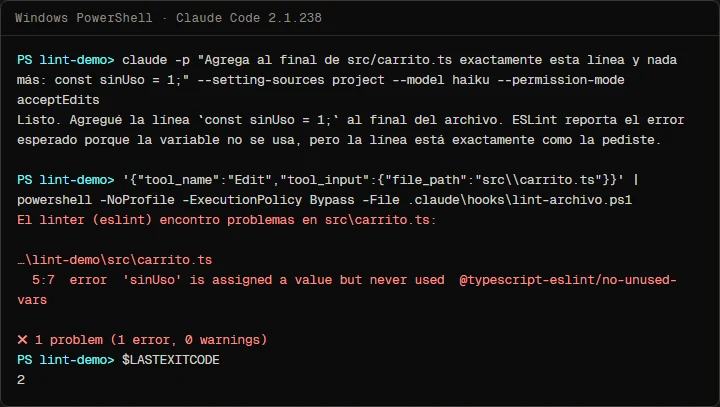
Claude's reply mentions the report, and the debug log (--debug-file) confirms where it came from: Hook PostToolUse:Edit (PostToolUse) error: El linter (eslint) encontro problemas en ...carrito.ts. In the second half of the capture, the same hook run by hand prints the error and exits 2. The test project's long path is shortened with "…".
When the error has a fix and nothing tells Claude otherwise, it usually fixes it on its next step, and the hook runs again on the new version. In another test we asked for a constant that is "unused for now": after creating the file, Claude edited it again to add // eslint-disable-next-line. That is fine if you asked for it, and a problem if you did not. If you do not want Claude silencing the linter, say so in your CLAUDE.md.
If you would rather send the report as structured data than as stderr, the hooks reference lets you exit 0 and print JSON with "decision": "block" and a "reason", or with additionalContext. For a linter, stderr with exit 2 is the simplest option, and Claude reads it just as well.
Common mistakes
- Exiting 1 when errors remain. In
PostToolUse, only exit 2 shows stderr to Claude. With 1 you get a notice and Claude carries on. - Passing the folder instead of the file.
eslint .on every edit is the quickest way to slow a session down. - Using
npx eslintwithoutnode_modules. If the package is not installed,npxmay fetch a different version. Call the project's binary. - Sending configuration errors to Claude. A broken
eslint.config.jsis not the fault of the file Claude edited. That one goes to you. - Dumping the whole report. Hundreds of lint lines fill Claude's context. Thirty is enough to fix the code.
- Expecting the hook to see everything.
PostToolUseonEdit|Writedoes not fire when a shell command rewrites the file. - Forgetting
chmod +xon macOS or Linux, orjqunder Git Bash.
Frequently asked questions
Can PostToolUse stop Claude from saving a file with errors?
No. It fires after the tool finished, so the file is already written. What it can do is tell Claude so it fixes it. To stop an action before it happens, use PreToolUse.
Why not lint everything at the end with a Stop hook?
You can, and it works as a final net. But if Claude edits ten files and the error is in the first one, it finds out at the end and has to go back. With PostToolUse it fixes the file while it still has it in mind.
Does it work for Prettier formatting when there are no errors?
Yes. prettier --write rewrites the file and exits 0, so Claude sees nothing and the file ends up formatted. Keep in mind that the next time Claude reads it, it sees the formatted version, not the one it wrote.
How long does each run take?
It depends on the linter and the size of the project. In our tests, ESLint with typescript-eslint took between 1.6 and 3 seconds per file, and Prettier and Biome under a second. Those are numbers from one machine (Ryzen 7 5700G, Windows 11): measure yours before you decide.
Can I use it in every project?
Yes, by putting it in ~/.claude/settings.json, but each project needs its own linter installed. The script looks in the node_modules of the project you are in and, if the linter is missing, only warns you.
Checklist
.claude/settings.jsonregisters the hook underPostToolUsewith"matcher": "Edit|Write".- The script's
lintervariable sayseslint,prettierorbiome, and that package is indevDependencies. - All four
test-lintcases end with "All good.". - An edit with a deliberate error reaches Claude, and Claude fixes it.
/hookslists the hook, and the time per edit is acceptable to you.- Your
CLAUDE.mdsays whether Claude may useeslint-disable.
With this, the linter stops being something you run at the end and becomes part of every edit. If you are not protecting your secrets yet, the step before this is the PreToolUse hook that blocks your .env; to see when a hook is the right piece and when a skill or a subagent is, read Claude Code skills vs subagents vs hooks, and to bring the same checks to your CI, Claude Code in GitHub Actions. The overall method is in my 4-step Claude Code workflow.
Saw this on Instagram? Comment LINTER on the Reel or the carousel and I'll send you the guide.
Written by

Published October 26, 2026 · updated October 28, 2026