
Claude Code GitHub Actions: review PRs and explain failures
From the work/ 11 min read
Three Claude Code workflows for GitHub Actions, with minimum permissions and time limits, plus what claude -p returns in CI.
- AI
- Claude Code
In this article (10)
- What claude -p is and what it returns
- Install the action: the secret and the app
- Use case 1: review every pull request
- Use case 2: explain why tests fail
- Use case 3: documentation with @claude
- Minimum permissions, time limits and cost
- Review what it proposes
- Common mistakes
- Frequently asked questions
- Checklist
Claude Code runs in GitHub Actions through the official anthropics/claude-code-action@v1 action and a key stored as a repository secret. With that it can review every pull request, explain why tests fail and answer when someone writes @claude, with minimum permissions and a time limit on each job.
This tutorial sets up those three use cases with workflows ready to copy, explains what claude -p returns (the headless mode all of this rests on) and how much each test cost. It is part 9 of our Claude Code tutorial series. One thing up front: the workflows follow the examples in the official docs and we validated their YAML, but we did not run them on GitHub for this guide; what we did run, locally, is the same explanation step with claude -p.
What claude -p is and what it returns
A CI runner has nobody in front of it typing into a terminal. That is what headless mode is for: claude -p "prompt" takes the task, works without asking and exits. Per the headless documentation, you can pipe text into it on standard input and pick the output format with --output-format: text, json or stream-json.
For scripts, json is the useful one. A minimal example (the prompt asks it to just say "ok"):
echo "di solo: ok" | claude -p --max-turns 1 --output-format jsonIn our test, with Claude Code 2.1.238, that JSON included these fields among others:
| Field | What it holds | What it is for in CI |
|---|---|---|
result | The final answer as text | What you publish in the log or a comment |
is_error | true if the run failed | Deciding whether the step fails |
num_turns | How many turns it used | Seeing whether it is close to your --max-turns |
total_cost_usd | The estimated cost of that run | Measuring what each run costs |
session_id | The session identifier | Continuing it with --resume |
permission_denials | The tools it was denied | Knowing whether it lacked a permission |
--max-turns does not appear in that version's claude --help, but the GitHub Actions docs recommend it in claude_args and the CLI accepted it in all our tests.
Install the action: the secret and the app
The GitHub Actions documentation gives two paths, and both need admin access to the repository:
- Quick: open
claudein the repository and run/install-github-app. It installs the Claude GitHub App, saves the secret and prepares a PR with the workflow. It needs the GitHub CLI (gh) logged in and only works with github.com repositories. - Manual: install the Claude app, add the secret under Settings → Secrets and variables → Actions and copy the workflow into
.github/workflows/.
The secret is one of two: ANTHROPIC_API_KEY, a key from the Claude Console billed by usage, or CLAUDE_CODE_OAUTH_TOKEN, which you generate locally with claude setup-token and which uses your subscription. In the workflow it goes to anthropic_api_key or claude_code_oauth_token. It is never written in the file: always ${{ secrets.ANTHROPIC_API_KEY }}.
Inside a CI job, the whole flow looks like this:
Scroll the figure sideways to see all of it
Use case 1: review every pull request
This workflow is the docs' "Run a skill" example with two GitHub additions: a timeout-minutes and a concurrency block that cancels the previous review when a new push lands on the same PR. It installs the code-review plugin and runs it on every PR that is opened, updated or marked ready for review:
# Review every pull request with Claude Code's code-review plugin.
# Based on the "Run a skill" example at code.claude.com/docs/en/github-actions.
# Claude comments on the PR's lines, or leaves one comment if it finds nothing.
name: Claude review

on:
  pull_request:
    types: [opened, synchronize, ready_for_review, reopened]

# A new push to the same PR cancels the previous review: you do not pay twice.
concurrency:
  group: claude-review-${{ github.event.pull_request.number }}
  cancel-in-progress: true

jobs:
  review:
    runs-on: ubuntu-latest
    timeout-minutes: 15
    permissions:
      contents: read
      pull-requests: read
      issues: read
      id-token: write
    steps:
      - uses: actions/checkout@v6
        with:
          fetch-depth: 1
      - uses: anthropics/claude-code-action@v1
        with:
          anthropic_api_key: ${{ secrets.ANTHROPIC_API_KEY }}
          plugin_marketplaces: "https://github.com/anthropics/claude-code.git"
          plugins: "code-review@claude-code-plugins"
          prompt: "/code-review:code-review --comment ${{ github.repository }}/pull/${{ github.event.pull_request.number }}"
          claude_args: '--allowedTools "mcp__github_inline_comment__create_inline_comment"'
Two lines decide where the review shows up. --comment makes Claude comment on the PR's lines, or leave a single comment if it finds nothing; without it, the findings only live in the run log. And claude_args names the inline-comment tool, because the action only starts that MCP server if --allowedTools mentions it. Per the docs, Claude skips draft and closed PRs and those that already have a comment from it, and in public repositories it does not run on PRs from forks, because GitHub withholds secrets from them.
If you already have a reviewer of your own, like the subagent from part 6, the checkout puts it on the runner: you can change the prompt to use it.
Use case 2: explain why tests fail
When a test fails in CI, the first job is reading hundreds of log lines. This workflow saves the output of npm test and, only if it fails, asks Claude for a short explanation in the run log:
# CI with an explanation: if the tests fail, Claude reads their output and
# explains the cause in the run log. It does not change any file.
name: CI

on:
  pull_request:
  push:
    branches: [main]

concurrency:
  group: ci-${{ github.ref }}
  cancel-in-progress: true

jobs:
  test:
    runs-on: ubuntu-latest
    timeout-minutes: 15
    permissions:
      contents: read
      id-token: write
    steps:
      - uses: actions/checkout@v6
      - uses: actions/setup-node@v7
        with:
          node-version: 22
      - run: npm ci
      - name: Tests
        id: tests
        # shell: bash turns on pipefail: if npm test fails, the step fails even though tee does not.
        shell: bash
        run: npm test 2>&1 | tee test-output.txt
      - name: Explain the failure
        if: failure() && steps.tests.outcome == 'failure'
        uses: anthropics/claude-code-action@v1
        with:
          anthropic_api_key: ${{ secrets.ANTHROPIC_API_KEY }}
          prompt: |
            The tests in this repository failed. Their output is in test-output.txt.
            Explain in under 15 lines: which test fails, the most likely cause and
            which file to look at. Do not change any file.
          claude_args: '--max-turns 5 --allowedTools "Read,Grep,Glob"'
Three details. shell: bash is not decoration: with it, GitHub turns on pipefail and the step fails when npm test fails, even though tee succeeds. The steps.tests.outcome == 'failure' condition keeps Claude from running when what failed was the install. And --allowedTools "Read,Grep,Glob" gives it just enough to read the file and the code, with no way to edit.
We tested this step locally with a script from the ZIP that does the same thing with claude -p: it runs the tests and, if they fail, pipes the output to Claude. We deliberately broke the store from part 8, raising shipping from €4.90 to €5.90. The capture shows the Spanish script, with Claude answering in Spanish:
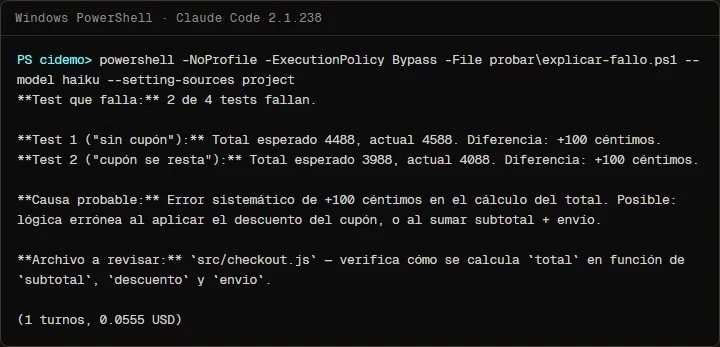
The explanation found the two failing tests and the exact 100-cent difference, and sent us to the right file. The cause it gave was vague ("a systematic error in the total calculation"): it did not say the shipping constant had changed. The English script, on the English store with the same bug, did say shipping was 590 instead of 490 in its PowerShell run. That is what to expect from this step: a good lead to start from, not a closed diagnosis. Each run with Haiku cost between USD 0.048 and 0.059.
Use case 3: documentation with @claude
The third workflow does not run on its own: it waits for someone with write access to mention @claude in an issue or a PR. It is the docs' example with a timeout-minutes and a turn cap:
# Claude answers when someone with write access writes @claude in an issue or
# a PR: for example, "@claude document the summary function in docs/".
# Based on the "Respond to @claude mentions" example in the documentation.
name: Claude Code

on:
  issue_comment:
    types: [created]
  pull_request_review_comment:
    types: [created]

jobs:
  claude:
    if: contains(github.event.comment.body, '@claude')
    runs-on: ubuntu-latest
    timeout-minutes: 30
    permissions:
      contents: write
      pull-requests: write
      issues: write
      id-token: write
      actions: read
    steps:
      - uses: actions/checkout@v6
        with:
          fetch-depth: 1
      - uses: anthropics/claude-code-action@v1
        with:
          anthropic_api_key: ${{ secrets.ANTHROPIC_API_KEY }}
          claude_args: "--max-turns 20"
For documentation, the typical use is a comment on a feature's PR: "@claude document in docs/checkout.md how free shipping works and add an example". Claude replies in a comment it keeps updating as it works and pushes the changes as commits. That is why this workflow asks for contents: write, and why whatever it proposes gets reviewed before merging, like anyone else's commits.
A detail from the docs that saves a headache: GitHub does not trigger workflows on commits made with the default GITHUB_TOKEN. If you pass github_token: ${{ secrets.GITHUB_TOKEN }} to the action, your CI will not run on Claude's commits; without that line, the action authenticates as the Claude app and CI runs.
Minimum permissions, time limits and cost
Each workflow asks only for what it uses:
Scroll the figure sideways to see all of it
All three include id-token: write, which the action needs to authenticate as the Claude app. The action also checks who triggers each run: on issue and PR events, the person needs write access to the repository, and bots are rejected unless you list them in allowed_bots, so they cannot trigger each other in a loop.
To keep a run from dragging on or multiplying, there are three brakes, all in the ZIP's workflows:
--max-turnsinclaude_args: stops Claude after that many turns.timeout-minuteson the job: GitHub kills the job if it runs past that time.concurrencywithcancel-in-progress: a new push cancels the previous run for the same PR.
Each run consumes two things: GitHub Actions minutes and Claude tokens, or your subscription if you use CLAUDE_CODE_OAUTH_TOKEN. As a reference from our local tests, not a price list: explaining a failure with Haiku cost about USD 0.05, and in part 6 reviewing a 20-line file with Sonnet cost about USD 0.15. Cost grows with the size of the diff, of your CLAUDE.md and of the files it reads. To know it for your repository, check total_cost_usd on your first runs.
Review what it proposes
The rule is the same as with a new person on the team: nothing goes into main without review. In practice:
- Review comments are suggestions: you decide which to apply.
@claude's commits land on a branch or a PR; they go through your CI and your review like any others.- Protect
mainwith branch rules so nothing, the Claude app included, can merge without approval. - Write your code rules in
CLAUDE.md: Claude reads it on every run, and the docs recommend keeping it short, because it costs tokens too.
Common mistakes
- Writing the key into the YAML. It always goes in a secret. If you ever committed it, revoke it in the Console: deleting the commit is not enough.
- Giving every workflow
contents: write. Only the@claudeone needs it. Review and explanation work with read access. - Forgetting
shell: bashwithtee. Withoutpipefail, the test step stays green even when tests fail, and Claude never runs. - Setting no limits. Without
--max-turnsortimeout-minutes, a run that gets tangled keeps spending minutes and tokens. - Passing
github_tokenby accident. With the default token, your CI does not run on Claude's commits. - Expecting reviews on fork PRs. In public repositories, GitHub withholds secrets from those runs.
Frequently asked questions
Should I use an API key or my subscription?
For a personal repository, the claude setup-token token uses your subscription. For an organization, the docs recommend a Console API key, because the token is tied to the subscription of whoever generated it.
Can Claude merge on its own?
With contents: write it can push commits. Whether it can merge into main depends on your branch protection rules; set them to require human approval.
Where do I see what it did on each run?
In the job log under the Actions tab. In interactive mode, also in the comment Claude keeps updating on the issue or PR.
Does it work with GitLab?
This action is GitHub-only. The docs have a separate page for GitLab CI/CD.
What if I want it to plan before changing anything?
--permission-mode plan in claude_args keeps it planning without editing, as in plan mode. It is handy for having it propose a plan on an issue before anyone approves it.
Checklist
- The
ANTHROPIC_API_KEYorCLAUDE_CODE_OAUTH_TOKENsecret is in the repository, not in the YAML. - The Claude app is installed on the repository.
- Each workflow has only its use case's permissions, plus
id-token: write. - Jobs have
timeout-minutes, and Claude steps have--max-turns. - You tested the explanation step locally with
explain-failurebefore pushing it. mainrequires human review before merging.
With these three workflows, Claude reviews, explains and documents inside your repository, and you still decide what gets in. If you would rather review locally before pushing, start with the reviewer subagent; for changes that arrive with a plan behind them, plan mode; and for formatting on every edit, the linter hook. If your repository keeps secrets locally, also look at the hook that protects your .env. The overall method is in my 4-step Claude Code workflow.
Saw this on Instagram? Comment BOT on the Reel or the carousel and I'll send you the guide.
Written by

Published October 26, 2026 · updated October 28, 2026