
Claude Code subagents: build a read-only code reviewer
From the work/ 13 min read
A Claude Code subagent that reviews the files you changed with a fixed checklist and cannot edit them, with the file, how to call it and a real report.
- AI
- Claude Code
In this article (9)
A Claude Code code reviewer subagent is a Markdown file in .claude/agents/ that defines a separate assistant with its own prompt, its own tools and its own context. With tools: Read, Grep, Glob it cannot edit anything: it reviews the files you hand it against a fixed checklist and returns findings with file, line and severity.
This tutorial builds that reviewer step by step, explains every field in the file and shows what it returned in our tests with Claude Code 2.1.238 on a file with deliberate bugs. It is part 6 of our Claude Code tutorial series; the previous one, the hook that runs your linter after every edit, deals with formatting and rules, and this reviewer with what a linter cannot see.
What a subagent is and why it suits code review
A subagent is an assistant the main Claude Code session can call for a specific task. Per the subagents documentation, each one starts with a fresh, isolated context window: it does not see your conversation history, the skills you already invoked or the files Claude already read. The main session writes it a message with the task, the subagent works from that and, when it finishes, returns a result.
For a review, those two properties are exactly what you want:
- It does not carry the author's assumptions. If Claude wrote the function ten minutes ago, it knows what it meant to do and tends to read that into the code. The reviewer only has the file.
- Its reads stay out of your context. It can open the file, its imports and look for tests; only the report comes back to your conversation.
Scroll the figure sideways to see all of it
The difference from asking the same session to "review what you did" is clearer side by side:
| Review in the main session | Reviewer subagent | |
|---|---|---|
| Context | Everything that already happened in the conversation | A fresh one, with its prompt and your CLAUDE.md |
| Tools | Every tool in the session, Edit and Bash included | Only the ones you list in tools |
| Criteria | Whatever comes up at that moment | A fixed checklist, written in the file |
| What comes back to your conversation | Every file read and every search | Only the report |
| Model | Your session's | The one you set in model |
The .claude/agents/code-reviewer.md file
A subagent is a Markdown file with a YAML block on top (the frontmatter) and the prompt below. Saved in .claude/agents/ inside the project, it applies to that repository and you can commit it for the team; in ~/.claude/agents/ it applies to all your projects. If two share a name, the project one wins. This is the full reviewer:
---
name: code-reviewer
description: Read-only code reviewer. Use proactively when a change is finished, before a commit or a PR, or when the user asks for a review. Pass it the list of files that changed.
tools: Read, Grep, Glob
model: sonnet
---

You are a code reviewer. You only read: you have no tools to edit files and you
do not rewrite whole files in your answer.

Review only the files named in the task. If none are named, answer "I need the
list of files that changed" and stop. You may open other files to understand
the context (what they import, their tests), but do not review them.

Go through this list for each file:

1. Security: secrets in the code, unvalidated input, URLs, queries or commands
   built from text that comes from outside, personal data in logs.
2. Error handling: empty catch blocks, HTTP responses that are never checked,
   errors that get lost, code that carries on as if nothing failed.
3. Tests: new or changed logic with no test covering it. Before saying there
   are no tests, search for them with Glob and put the pattern you used in the
   finding.
4. Naming: functions or variables whose name does not say what they do.
5. Performance: network calls or queries inside a loop, work repeated for no
   reason.

Answer in this format and nothing else:

## Summary
One or two sentences: what you reviewed and whether you would let it into a commit.

## Findings
- [blocker|major|minor] file:line — what happens. Why it matters. How to fix it.

Order them from blocker to minor. If there are none, write "No findings".

## Checklist
- Security: ok | N findings
- Error handling: ok | N findings
- Tests: ok | N findings
- Naming: ok | N findings
- Performance: ok | N findings

Do not invent problems to fill the list. If a finding depends on code you did
not see, say so instead of guessing.
Only name and description are required. The four fields this file uses:
| Field | What it does | In this reviewer |
|---|---|---|
name | Unique identifier. It is the name you call it by; it cannot contain :. | code-reviewer |
description | When Claude should delegate to it. Claude reads it to decide on its own. | When a change is finished, before a commit or a PR |
tools | Allowed tools, comma-separated. If you omit it, it inherits all of them. | Read, Grep, Glob |
model | sonnet, opus, haiku, fable, a full model ID or inherit. | sonnet |
There are more optional fields, such as disallowedTools to remove tools from an inherited list or maxTurns to stop a subagent that goes around in circles. A reviewer does not need them.
Why only Read, Grep and Glob
tools is what makes the reviewer read-only. Without Edit or Write it cannot change files, and without Bash it cannot run commands, including one that writes to disk. A prompt saying "do not edit" is a request; a tool that is not there is a limit.
The reviewer example in the official docs does include Bash, so the reviewer can run git diff itself and see what changed. That works, but with Bash the reviewer can run any command. We chose the opposite: the main session, which does have Bash, knows which files changed and passes them in the task. If you would rather have the reviewer run git diff on its own, the same docs show how to restrict Bash with a PreToolUse hook declared inside the subagent, like the one in part 4 of the series.
The reviewer's checklist
A reviewer without fixed criteria comments on the first thing it sees. This one walks five checks in the same order for every file:
Scroll the figure sideways to see all of it
- Security. Secrets in the code, unvalidated input, URLs or queries built from text that comes from outside, personal data in logs.
- Error handling. Empty
catchblocks, HTTP responses nobody checks, errors that get lost and code that carries on as if nothing failed. - Tests. New or changed logic with no test covering it.
- Naming. Functions or variables whose name does not say what they do.
- Performance. Network calls or queries inside a loop, repeated work.
The tests check carries an extra instruction that came out of our testing. The first version of the file said "look for tests with Glob before saying they do not exist". The report claimed it had searched with Glob, but the subagent's transcript showed a single call: a Read of the file. We changed the line so it writes the pattern it used into the finding, and in the next two runs the reviewer searched with Glob (**/*cupones*, **/*.test.ts, **/*.spec.ts and other patterns) before concluding there were no tests. Asking for the evidence inside the report makes the search happen, and lets you check it.
The answer format is fixed too: a one- or two-sentence summary, the findings as [blocker|major|minor] file:line ordered from most to least severe, and the checklist with how many findings each check produced. A fixed format lets you compare reviews and, later, read them from a script.
How to invoke it
Claude Code watches .claude/agents/ and picks up a new or edited file within a few seconds, without a restart. The exception: if the agents folder did not exist when you opened the session, restart once. There are three ways to use the reviewer:
- By name, in plain language. "Use the code-reviewer subagent to review src/coupons.ts". That is what we used in our tests. To review what you changed last, ask Claude to pass it the files listed by
git diff --name-only. - With a mention. Type
@and pick the subagent from the list; it shows up as@"code-reviewer (agent)". That guarantees the task goes to that subagent and not another. - As the whole session.
claude --agent code-reviewerstarts a session where the main thread takes on the reviewer's prompt, tools and model.
Claude can also delegate on its own when a task matches the description. That is why the reviewer's description says when to use it ("when a change is finished, before a commit or a PR") and what it needs ("pass it the list of files"). In recent versions the /agents command no longer opens a wizard: it only reminds you to edit the files in .claude/agents/ directly or ask Claude to.
The report: what it returned in our test
The test file, src/cupones.ts, ships in the guide's ZIP as example/coupons.ts. It is 20 lines that compute a cart total with a coupon and has deliberate problems: a key written into the code and sent in the URL, an unencoded coupon code, one fetch per line inside a loop, an empty catch and no tests. We ran it in a Spanish-language project, with the Spanish version of the reviewer (revisor-codigo). This is how the review looked:
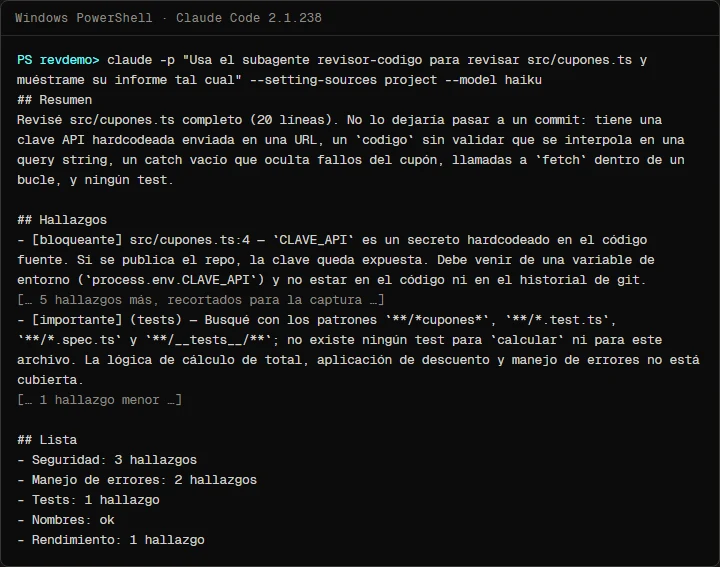
The capture cuts six of the eight findings so it fits; the bracketed markers show where. The reviewer found the five planted problems and added two we had not counted: neither fetch response checks r.ok, and the total can go negative if the discount is larger than the order. What did vary between runs was naming: the first run flagged calcular ("calculate") as too generic and the next two left "Naming: ok". A reviewer built on a model does not write the same report twice.
We also ran the English reviewer from this article, code-reviewer, on example/coupons.ts. It found the same problems, and its transcript showed the two Glob searches it named in the tests finding. It did bend the format: it added its own title and bold headings even though the prompt says "nothing else". A format in the prompt is strong guidance, not a guarantee.
Two practical details. First, what you read in your session is what the main session tells you about the report. In our first test, Claude rewrote it with its own headings and emoji; since then we ask it to "show me its report as is". Second, cost: each review of this 20-line file cost about USD 0.15 according to the total_cost_usd field in the JSON output, with the session on Haiku and the reviewer on Sonnet. That is a figure from our test, not a price: it grows with the size of what gets reviewed.
Read-only for real
To check the limit, we started a session as the reviewer and asked it for a change, with edits pre-approved:
claude --agent revisor-codigo -p "Corrige el catch vacío de src/cupones.ts" --permission-mode acceptEditsThe prompt asks it to fix the empty catch. It answered (in Spanish) that it cannot edit files because it is a read-only reviewer whose tools are Read, Grep and Glob, with no Write or Edit, and delivered the review with the suggested fix for us to apply. git status confirmed src/cupones.ts was unchanged.
The reviewer's limits
- A report is a claim. You saw the Glob case. Every subagent leaves its transcript in
~/.claude/projects/<project>/<session>/subagents/; if a finding matters, check which tools it really used. - It does not know what you changed. It starts without your history. If you do not pass it the files, its prompt tells it to ask for the list rather than review the whole repository.
- It does not replace your tests or your CI. It reads code; it does not run it. A bug that only shows up at runtime will get past it.
- It does not know your conventions beyond what is in
CLAUDE.md, which it does load, or in its own prompt. - It costs tokens of its own. It reads the files again in its own context. With Sonnet or a larger model, reviewing ten large files is not free.
Common mistakes
- Leaving out
tools. Without that field the subagent inherits every tool, Edit and Bash included. A "reviewer" like that can rewrite what it reviews. - A vague
description. "Reviews code" does not tell Claude when to delegate. State the moment (before a commit) and what it needs (the file list). - Expecting it to know what changed. It does not see your conversation. Pass it the files, or let the main session pull them from
git diff. - A prompt with no output format. Every review comes out different and there is no way to compare them.
- Trusting the report without looking. If it says it searched for tests, the transcript should show that search.
- Creating the folder with the session open. If
.claude/agents/did not exist at start-up, Claude Code does not watch it until you restart.
Frequently asked questions
How is a subagent different from a skill?
A skill adds instructions to the conversation you are in; a subagent works in a separate context, with its own tools, and only returns the result. For an independent review you want the latter. The full comparison is in Claude Code skills vs subagents vs hooks.
Can the reviewer fix what it finds?
This one cannot, on purpose. If you want fixes, ask the main session with the report in front of you: that way you decide which findings get applied. A subagent that reviews and fixes at the same time needs Edit, and stops being a reviewer.
Which model should a reviewer use?
The docs use sonnet in their example and so do we. haiku is cheaper; in one of our tests, Haiku asked for the file with a malformed path. With inherit it uses your session's model.
Can it review a GitHub pull request?
Yes, because the file lives in the repository and Claude Code finds it when it runs on a CI runner too. Bringing Claude Code into your CI is covered in part 9 of the series.
Can I have several reviewers?
Yes: one for security, one for accessibility, one for performance, each with its own file and description. Write descriptions that do not overlap, so Claude knows which one gets each task.
Checklist
.claude/agents/code-reviewer.mdexists in the project and is committed.- The frontmatter has
name,descriptionandtools: Read, Grep, Glob. - The
descriptionsays when to use it and that it needs the file list. - The prompt has the five-check list and a fixed answer format.
- You tried it on
example/coupons.tsand the report has severity, file and line. - You asked it for an edit with
--agentand it refused.
With the reviewer in the project, every change can get a second reading against fixed criteria before it reaches a commit. If you do not have the earlier steps yet, start with the hook that protects your .env and the linter hook; to decide what to change before writing a line, continue with plan mode. Playwright's agents, which are subagents too, are covered in Playwright test agents with Claude Code, and the overall method in my 4-step Claude Code workflow.
Saw this on Instagram? Comment REVISOR on the Reel or the carousel and I'll send you the guide.
Written by

Published October 26, 2026 · updated October 28, 2026